
 Appediet
 Custom Foods: Create or Reuse a Saved Entry
Save a food once, then reuse the checked entry when the same package or staple comes back.
Use a custom food when search results do not match the label or recipe you actually use. Check the serving basis the first time, save the entry, and review it again whenever the package or recipe changes.
When a custom food is useful
A custom food is most useful when the same item will probably return to your log. Common examples include a packaged snack with a specific serving size, a repeat breakfast, a house recipe portion, or a regional product that is difficult to find through ordinary search.
Before creating anything, search once and compare any result with the current package. If an existing result uses the same product, serving basis, and nutrition values, creating a duplicate may add clutter. If the product or serving basis differs, a clearly named custom entry can make the distinction easier to see later.
Custom foods are not a substitute for reading a changed label. Manufacturers can revise serving sizes or formulations. Treat the saved entry as a reusable record of the package you checked, not as a permanent statement about every future package.
Read the serving basis first
The most important label question is not the product name. It is: What amount do these numbers describe?
Start with the serving size and servings per container. Then check whether the nutrition values are stated per serving, per 100 grams, per package, or on another basis. The U.S. Food and Drug Administration explains that serving information sets the basis for the calories and nutrients shown on a Nutrition Facts label. A two-serving package can therefore require a different log quantity from a one-serving package, even when the package looks similar.
Keep the units together while reading. Grams, milliliters, pieces, scoops, and packages are not interchangeable. If the current Appediet form asks for a value that is not on the label, do not guess. Use only information you can trace to the package or another reliable first-party source.
Separate the source record from the amount you eat
A reusable food record and a meal quantity answer different questions. The record describes a known basis—such as one 30-gram serving or 100 milliliters—while the meal log describes how much of that basis you consumed this time.
Keeping those two layers separate reduces avoidable conversions. For example, if a label states values for a 30-gram serving, the custom record can preserve that 30-gram basis. When you later eat one and a half servings, adjust the meal quantity rather than rewriting the source values as though the package changed.
The same principle applies to a container with several servings. Do not multiply every nutrient into whole-package values unless the record is deliberately defined as the whole package and clearly named that way. A record called “one serving” should remain tied to one serving. A record called “whole package” should use the package total. Consistent naming and values make later reuse easier to audit.
If you perform a calculation, keep the original label available until the first saved entry has been checked. That gives you a reference if the meal total looks unexpected. It also makes it easier to distinguish a math error from a quantity choice.
Start from My Food in Appediet
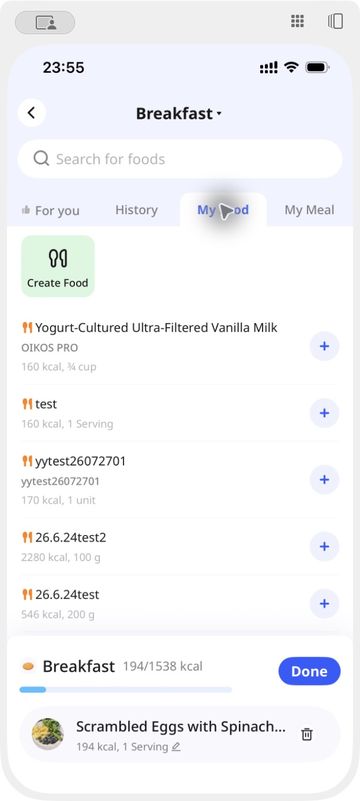
Open the add-food page for the meal you are logging, then choose My Food. On the current screen captured for this guide, the tab shows a Create Food button above a list of saved entries.
Tap Create Food to begin a new entry. The exact form layout can change with the app version, so follow the fields presented on your device rather than relying on a fixed sequence from an older tutorial. Use a name that will still make sense in a later search. Adding a flavor, package size, or serving description can help distinguish similar products when those details matter.
Enter only the values supported by the current label. Keep calories and nutrient values on the same serving basis. If the label uses per-100-gram values while you usually eat a different amount, preserve that basis accurately and handle the eaten amount when logging, according to the controls available in your current version.
Check the first saved entry
After completing the entry using the controls shown in the current app, review it before treating it as reusable. Compare the saved name, serving quantity, unit, calories, and any visible nutrients with the source label.
- Check that values for the whole package were not named as one serving.
- Check that milligrams and grams were not mixed.
- Check that a per-100-gram value was not copied as a per-serving value.
- Check whether the package contains more than one serving.
- Use a name that will be recognizable later.
Reuse a saved custom food
The reuse path is shorter. Return to the add-food page, select My Food, find the saved item, and use the plus button beside the relevant row. Then adjust the quantity for what you actually ate and complete the meal entry using the current controls.
The saved item still needs a brief context check. Confirm that you selected the intended flavor or version, that the package has not changed, and that the quantity matches the meal. Reuse is a convenience for repeated inputs; it does not remove the need to notice a reformulated product or a different portion.
Clear naming helps here. If two packages share a brand family but use different serving sizes or formulations, include enough neutral detail to tell them apart. Avoid claims such as “healthy” or “low calorie” in the saved name unless those exact terms are part of the source label and useful for identification.
Use names that survive the next search
A short, descriptive name can prevent duplicate entries. Start with the food identity, then add only details that distinguish one saved record from another: flavor, preparation, package size, or the serving basis. The name does not need to reproduce every line of the label.
Dates can help when a product changes often, but they are not required for every entry. Add a month or year when it is useful for separating an older label from a replacement. If you create a corrected version, make the distinction visible so the outdated record is not selected by mistake.
Avoid putting estimated health effects or personal judgments into the name. Those descriptions can become misleading when the portion changes, and they do not help identify which label supplied the values. A neutral name keeps the record focused on the source food.
What to do when the package changes
Compare the current package with the source used for the saved entry. Pay attention to serving size, servings per container, calories, and any nutrients you rely on. If the basis or values changed, update the record using the controls available in your current version, or create a clearly named replacement when editing is not available.
Do not silently reuse an older record for a changed product. If you keep both versions, add a date, package size, or other distinguishing detail to the names. The goal is traceability: later, you should be able to tell which label each entry represents.
A compact custom-food checklist
Before saving
- Search for an existing match.
- Read the serving basis.
- Keep values on one basis.
- Use supported values and units.
- Choose a recognizable name.
Before reusing
- Select the intended saved item.
- Check for package changes.
- Adjust the eaten quantity.
- Review the meal entry.
Frequently asked questions
Do I need a custom food for every packaged product?
No. Search first. A custom entry is mainly useful when the available result does not match the current product and serving basis, or when a repeat item needs a clearly identifiable record.
Can I copy nutrition values from a similar product?
That can create a misleading entry. Use the current package label or another reliable source for the exact product. If a required value is unavailable, do not invent it.
Where can I find a saved custom food?
On the current Appediet add-food screen used for this guide, saved entries appear under My Food, with a plus button beside each row for adding the item.
Should I keep using the same entry after a label change?
Review it first. When serving size, formulation, or nutrition values change, update the record through the current app controls or create a distinct replacement that you can identify later.
Keep repeated foods easier to find
Use My Food when a repeat item needs a traceable entry based on the label you checked.
Download AppedietSources
U.S. Food and Drug Administration: How to Understand and Use the Nutrition Facts Label
App Store: Appediet listing and version history
Appediet local product guide screenshot, captured October 29, 2026.