
 Appediet
Changing Your Appediet Calorie Goal? Check These Inputs First
Before changing an Appediet calorie goal, review units, profile inputs, daily intake, macro ratios, meal shares, and the reset boundary.
The current My Goals screen groups daily intake, macro ratios, meal shares, and a reset action. Check the inputs and the effect of one change before treating any displayed target as personal guidance.

What the current screen proves—and what it does not
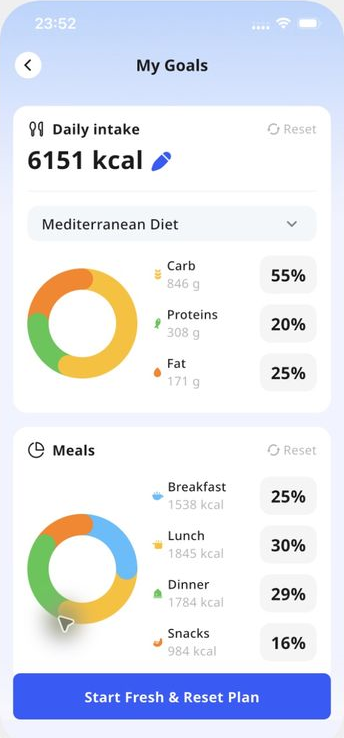
An Appediet My Goals screen captured on October 30, 2026 shows four visible elements: a Daily intake value with an edit icon, carbohydrate/protein/fat percentages, breakfast/lunch/dinner/snack percentages, and a Start Fresh & Reset Plan action.
The screen proves where those groups appear in that captured version. It does not reveal the calculation formula, confirm that every field is editable on every account, prove Android parity, or explain what data the reset action preserves.
| Visible element | What you can check | What not to assume |
|---|---|---|
| Daily intake | Confirm the displayed energy unit and whether the value matches the plan you intended to use. | The displayed number is not automatically a medical prescription or proof that the underlying inputs are current. |
| Macro split | Confirm that carbohydrate, protein, and fat percentages total 100 and reflect the plan you mean to follow. | The example percentages are not a recommendation for every person or condition. |
| Meal split | Confirm that breakfast, lunch, dinner, and snack shares total 100 and resemble your real meal pattern. | Changing the distribution does not by itself change the total daily goal. |
| Reset action | Pause and identify what you are trying to replace before starting fresh. | The label alone does not prove which history, plan settings, or records will be retained. |
Read the goal in three parts
Start with the daily total, then review the macro split and meal shares. Check one setting at a time before deciding whether to change it.
The numbers shown belong to this captured screen. They are not personal targets.
Before changing the daily intake
- Check the measurement units first. A correct number in the wrong unit can create a large error.
- Review the profile information that may affect an estimate, including age, height, weight, activity, and goal. This article does not claim which fields Appediet's current formula uses.
- Write down the current target, date, and reason for the change. That gives you a baseline if the new setting does not behave as expected.
- Change one factor at a time when possible. If you change the daily intake, macro split, meal split, and plan together, it becomes harder to identify which change affected the screen you see next.
- After the change, revisit My Goals, the home or daily summary view, and one normal food log. Confirm that units and totals are internally consistent before relying on the new target.
USDA's DRI calculator notes that individual requirements may be higher or lower than its estimates. NIDDK's Body Weight Planner is for adults and excludes younger people and pregnant or breastfeeding women. An app setting should not override individualized medical guidance.
Check the macro split without turning it into a universal rule
The visible Appediet screen expresses carbohydrate, protein, and fat as percentages and also shows grams. First check that the percentages total 100. Then confirm that the grams and the daily intake are shown in the units you expect.
A macro split can be useful for organizing a plan, but it cannot diagnose a condition, guarantee a result, or establish that one eating pattern suits everyone. If you were given targets by a clinician or registered dietitian, preserve the exact units and confirm whether they were expressed as grams, percentages, or a range.
Do not copy the example percentages from the screenshot. They are included only to show the screen structure.
Make the meal split match the day you actually live
The visible screen divides the day across breakfast, lunch, dinner, and snacks. A useful check is whether those shares total 100 and whether they resemble your ordinary schedule.
- If you regularly skip a named meal, do not assume the default split represents your routine.
- If work, training, medication timing, or cultural meal patterns shape your day, consider those constraints before redistributing the same daily total.
- If the app shows a meal budget, treat it as a planning aid rather than a requirement to hit every meal percentage exactly.
- If a change causes confusion, return to the dated baseline you recorded and adjust one setting at a time.
Pause before using Start Fresh & Reset Plan
The captured screen includes a Start Fresh & Reset Plan button. The label indicates a consequential plan action, but the screenshot does not document the exact retention behavior.
Before using it, check the current confirmation screen and support information. If you need to preserve a target, profile value, or history, record it first. This article does not state that a reset deletes or preserves any particular data because that behavior was not verified.
When an app target is not enough
Use professional guidance when calorie or macro targets are part of medical care, pregnancy or breastfeeding, growth during childhood or adolescence, diabetes management, kidney disease, gastrointestinal disease, medication-related appetite or weight change, or recovery from an eating disorder.
NIDDK's Body Weight Planner explicitly limits itself to adults and says it is not intended to provide medical advice. The USDA DRI calculator provides population-based estimates and notes that individual needs may be higher or lower.
If tracking numbers increases anxiety, rigid restriction, bingeing, compensatory behavior, or shame, stop treating the target as a routine optimization problem and seek qualified support.
Frequently asked questions
Does Appediet calculate the right calorie goal for everyone?
No single app setting can be treated as correct for everyone. The current screen shows a target, but this article did not verify Appediet's formula or establish suitability for a specific person.
Should my macro percentages add up to 100?
On a percentage-based display, carbohydrate, protein, and fat shares should total 100. That arithmetic check does not prove the split is individually appropriate.
Do meal percentages change my daily calorie goal?
A meal split normally divides a daily total across eating occasions. Confirm the behavior in the current app after a change rather than assuming the total changed.
What does Start Fresh & Reset Plan delete?
The captured screen does not answer that question. Read the current confirmation step and support information before proceeding, and preserve any values you may need.
Sources
Use the current product flow
Check the latest Appediet experience and the current purchase terms before making a decision.
Download Appediet