
 Appediet
Your First Week with Appediet: A Simple 7-Day Start
Your first week does not need a perfect food diary. Start with one meal, learn how to review it, and add detail only when it helps.
The goal for seven days is to build a repeatable logging habit—not to judge your body or force every meal into an exact number. Each day below adds one practical skill.
Contents
The short answer: yes — start with one meal
Appediet is built around guided onboarding and simple photo logging, so you do not need to know calories, macros, or portion weights before you start. The app asks a few questions, helps you set a goal, and then gets out of the way. Your first log can be a single photo of whatever is already on your plate.
Week one is practice, not a test. Log a few ordinary meals, notice which input is easiest to review, and keep incomplete days visible instead of inventing details later.
The goal is a repeatable check-before-save routine. Estimate usefulness depends on clear food names, sensible portions, and visible notes about missing ingredients—not on treating the first result as exact.
Download Appediet to try it with your next meal.
Day 1: set up, set a goal, log your first meal
On day 1, open the app and complete the onboarding questions about your goal and starting point. Review the target shown in the app, knowing that settings can be revisited later.
Then log your first meal by photo: before you eat, take a clear photo with the whole plate in frame and good light. Appediet identifies the visible foods, estimates portions, and shows a result card with calories and macros. That card is the checkpoint — check it before you save anything.
Check it in this order: food names, then portions, then what the camera could not see — oil, butter, sauce, dressing, cheese, a sweetened drink. Add those before you save. AI estimates are estimates, not exact numbers and not medical advice, so your check is what makes the log useful.
Then save it — day one, done.
Days 2–3: try a few ways in
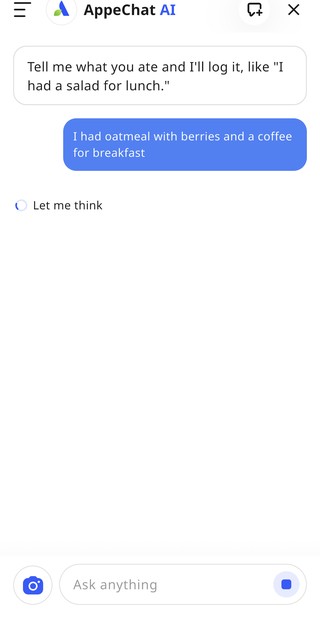
On days 2 and 3, try the other inputs, one each on a real meal. Each one fits a different kind of meal.
For a packaged food, use the barcode, then check that the product, flavor, serving size, and amount you ate match the package in your hand. A barcode finds the right product fast, but it cannot tell how much of the package you ate.
For a meal you can describe, use voice or typing: “I had oatmeal with berries and a coffee for breakfast.” Say the foods and the amounts, then check the result card before you save. If a word is misheard, say it again or switch to typing.
For a food you know by name, use food search and choose an entry that matches its preparation and serving basis. A mixed meal may be easier to describe or photograph, while search can suit a single familiar item.
Save your first repeat meal
If you eat the same checked meal again, a saved or repeat meal can reduce repeated entry work.
After checking a breakfast or lunch you eat often, save it for reuse. Next time, start from that record and change only what actually changed.
Try this with one repeat meal during the week. Recheck it whenever the ingredients, portion, or package label changes.
The difficult day: keep the chain unbroken
Every beginner hits a difficult day in week one: a late meeting, a restaurant meal, a day when logging feels like too much. Decide the plan in advance, so you do not have to decide it while tired.
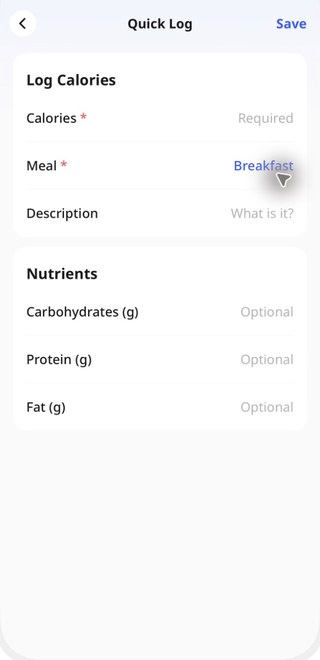
Quick Log records an approximate calorie total, with optional macro fields, when item-by-item detail is not available. It preserves a visible record but does not replace a food-level log.
If even that feels like too much, define your minimum useful log now: one photo plus one correction, or one Quick Log total. That is your floor — you never have to decide from zero on a hard day.
Your week in four moves
Put the week together and it is four moves, in order: try each method on one real meal each; save one repeat breakfast and one repeat lunch; define your minimum useful log for a difficult day; and review the pattern, not the single day.
At the end of the week, open the weekly report and ask one question: what repeated? Check the daily meals behind the summary, then choose one small adjustment or one logging gap to address next week.
| When | Do this |
|---|---|
| Day 1 | Quiz, goal, one photo meal, checked result card |
| Days 2–3 | Try barcode, voice or typing, and search |
| Days 4–5 | Save one repeat breakfast and lunch; use your minimum log |
| Days 6–7 | Open the weekly report, find one pattern, choose one small change |
What not to expect in week one
Do not expect exact numbers. AI estimates are estimates: a photo cannot weigh your food, see the oil absorbed in cooking, or know the recipe inside a restaurant dish. Treat a precise-looking number as a useful approximation, check the foods and portions behind it, and fix what you can.
Do not expect a complete routine after seven days. Week one is for learning which input fits each meal, how to check a result, and what minimum record is still useful on a busy day.
Finally, do not expect to need every feature at once. Photo, barcode, voice, typing, search, Quick Log, and saved meals are enough for week one. To learn what a paid option includes, check the Upgrade screen in the app — prices and availability vary by region and platform.
The bottom line
Your first week is a short practice cycle: complete onboarding, check a few normal meals, try more than one input, save one repeat meal, and review one weekly pattern. Keep the routine small enough to continue.
FAQ
Do I need to know anything about nutrition before I start?
No. You do not need to know calories, macros, or portion weights in advance. Start with one meal: take a photo or type what you ate, and check the result card. The app shows the numbers; your job is to check them and fix anything that looks wrong.
What if the photo result is wrong?
Fix it before you save: check the food names first, then the portions, then add anything the camera could not see, such as oil, sauce, or a drink. A corrected log beats a wrong one you accepted, and a meal you never logged.
Do I have to log every meal in the first week?
Aim for a useful record, not a perfect streak. If a meal is missing, leave the gap visible, log the next meal, and continue.
Is Quick Log cheating?
No. Quick Log is an approximate record for situations without item-level detail. Use it when that limitation is clear, and return to a food-level entry when you need ingredients or serving detail.
How long before logging feels easy?
The time varies by meal and by how much checking is needed. Saved meals and a familiar input method can reduce repeated steps, but the result should still be reviewed before saving.
Start with your next meal
One photo, one check, one save.
Download Appediet